AI-Augmented Design & Development Workflow
I integrate AI coding agents into my creative and development process to ship faster and at higher quality. Using Claude Code — Anthropic’s agentic coding tool — I’ve built a workflow where I collaborate with an AI agent that has access to my browser, my Figma files, a live dev server preview, and my local codebase simultaneously.
What I configured:
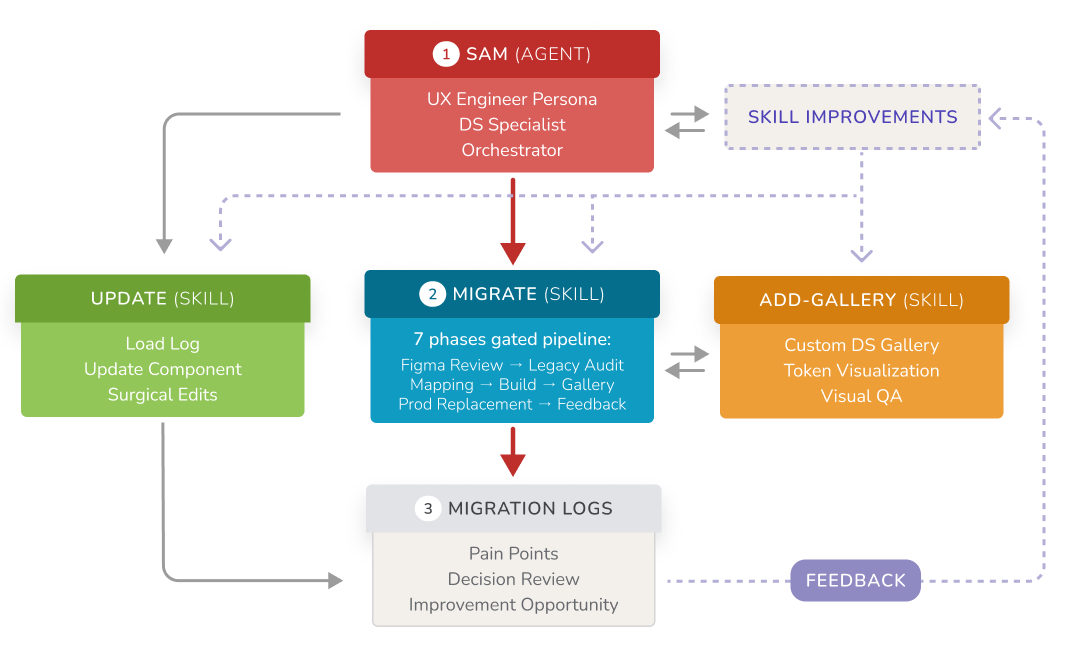
I set up and customized a multi-tool environment connecting Claude Code to:
- Figma (design-to-code extraction directly from my design files)
- Chrome browser automation (live testing, interaction, and debugging)
- Live preview server (instant visual feedback loop while building)
- Custom skills for frontend design, ensuring the agent follows my design standards rather than producing generic output
What this means in practice:
Rather than context-switching between design tools, code editors, and browsers, I work conversationally with the agent to go from concept to deployed output. For example, I built an interactive Lottie animation showcase for Photobucket — a responsive page with hover-to-play animations, a like/voting system, and mobile touch support — through iterative collaboration with the agent rather than writing every line from scratch.
Why this matters:
This isn’t about “using ChatGPT to write code.” It’s about architecting a human-AI workflow — choosing the right tools, defining quality standards through custom skills, and knowing when to direct the agent vs. when to let it solve problems autonomously. The result is a significant multiplier on speed and output quality, especially for prototyping and interactive front-end work.