
Drone Smoothie is video analysis software that automatically isolates cinematic segments from drone footage, a full-cycle project I’m building solo by leveraging modern AI workflows to ship production-ready software independently.
Building a software that helps detect cinematic drone shots to jump-start your creative process.

Using Claude code to build initial prototypes, smooth detection logic, ship and maintain production-level code.

Creating an Agent + Skills to automate the implementation of components from the Design System.
Vibe coded Prototype
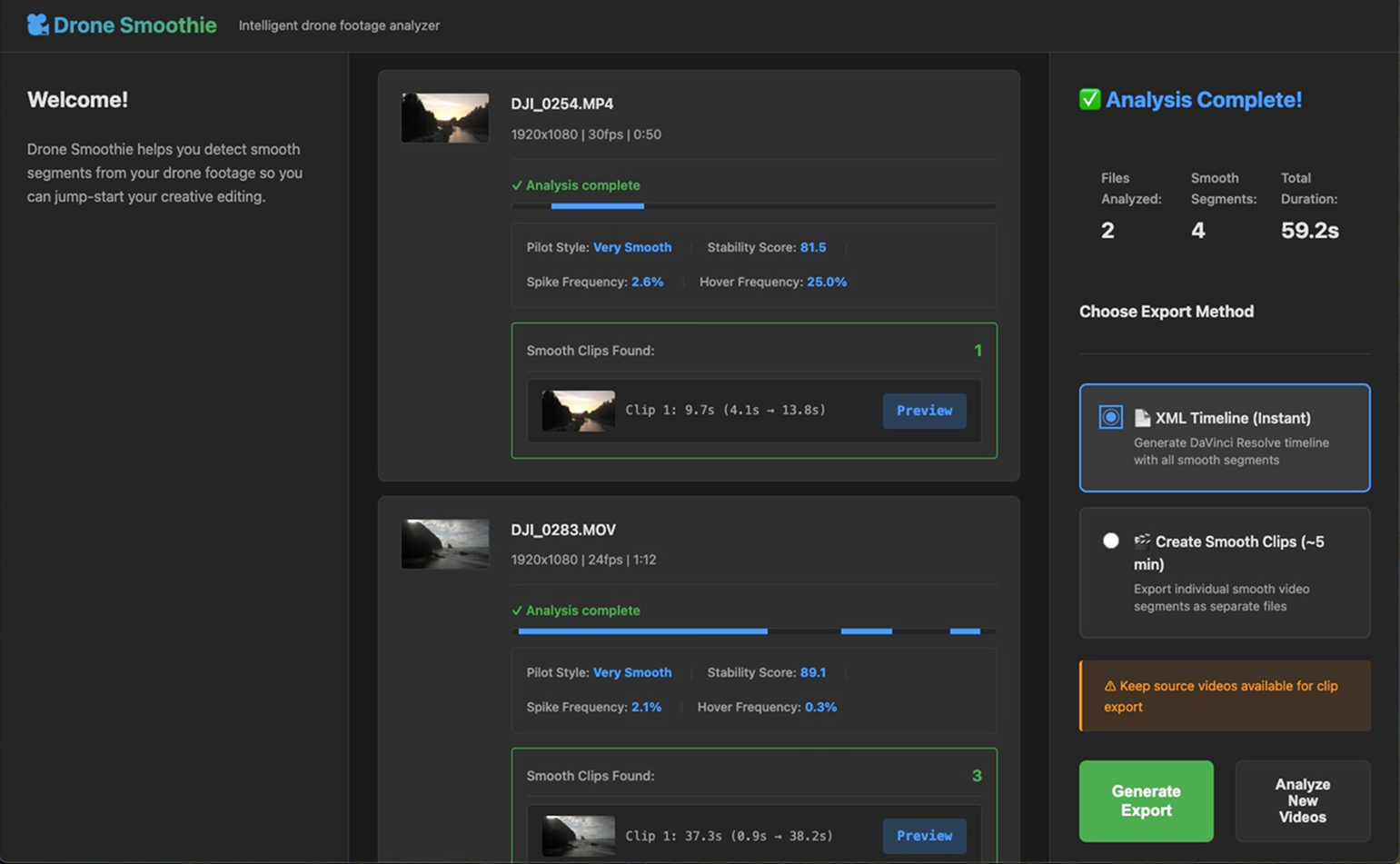
I pushed the functionality as far as I could to validate the concept first, polish comes later, anchored in reality not assumptions.
Figma Design
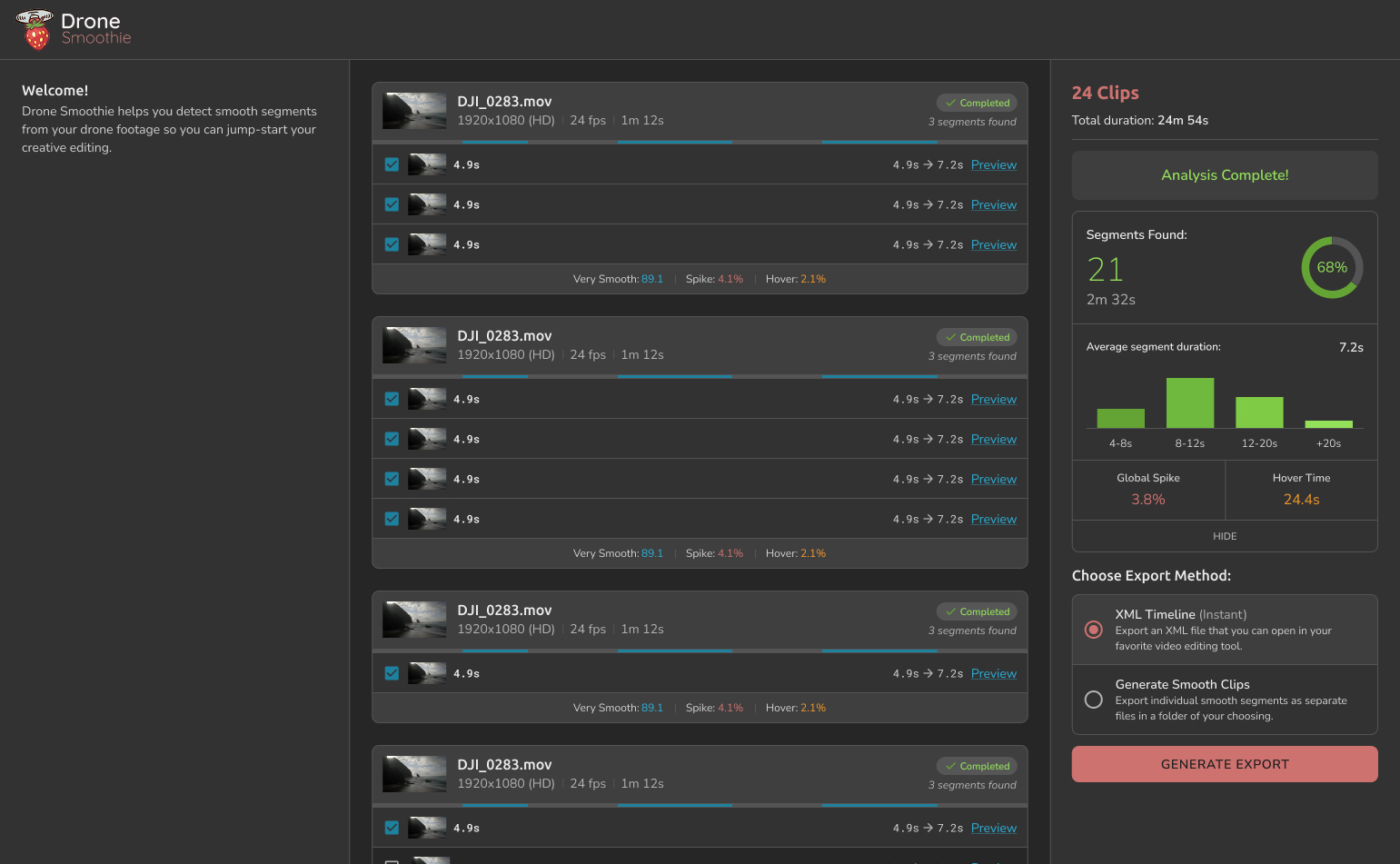
Design has been developed in parallel and implemented gradually with the help of the automated migration pipeline.
A UX Engineer agent (Sam) was created with a set of skills to help with the migration from Figma to code, replacing vibe-coded legacy components one by one.
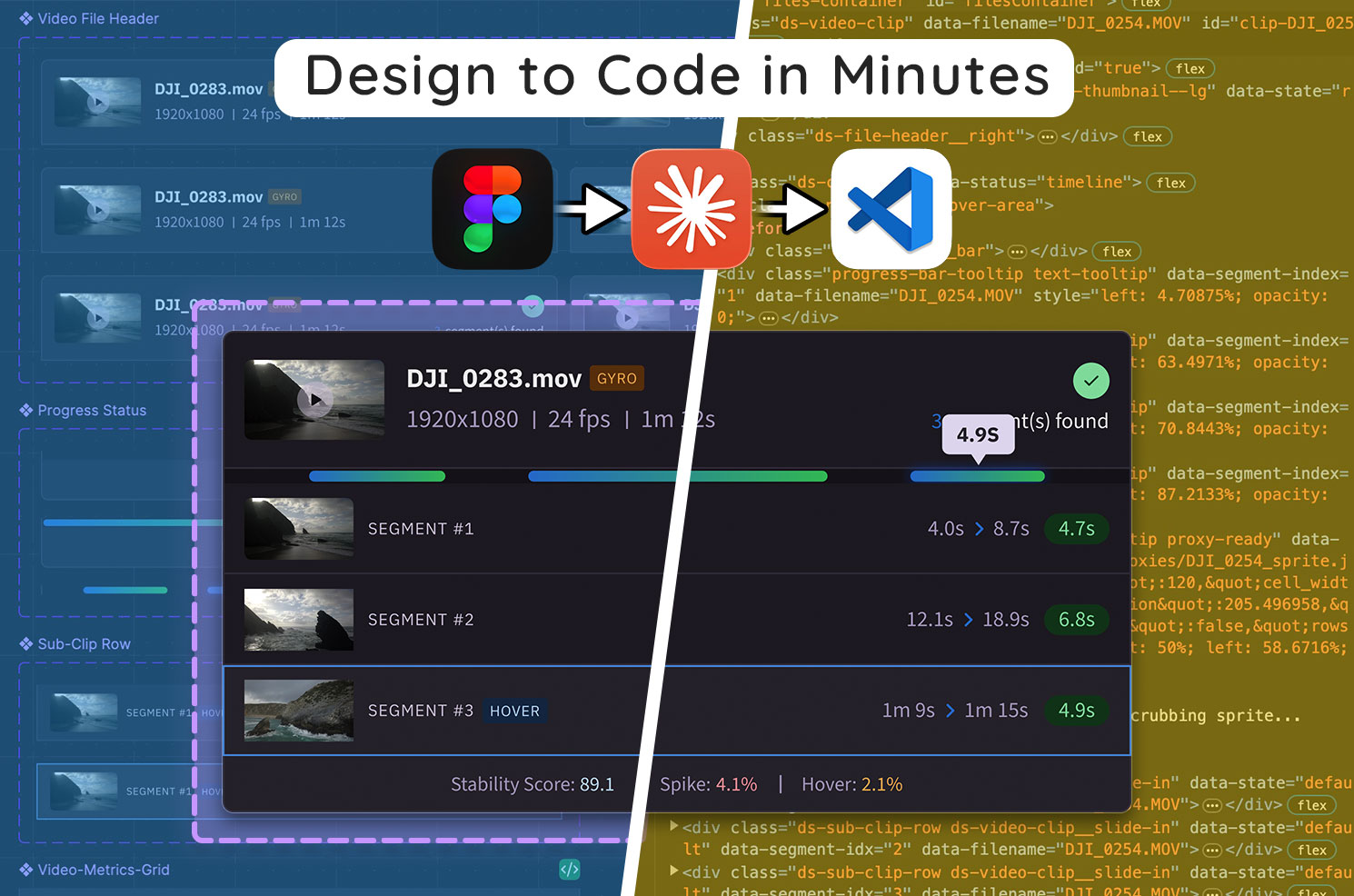
The agent doesn’t just complete the task and move on, he reflects on what worked and what didn’t based on our interactions and rewrites its own instructions at each migration.
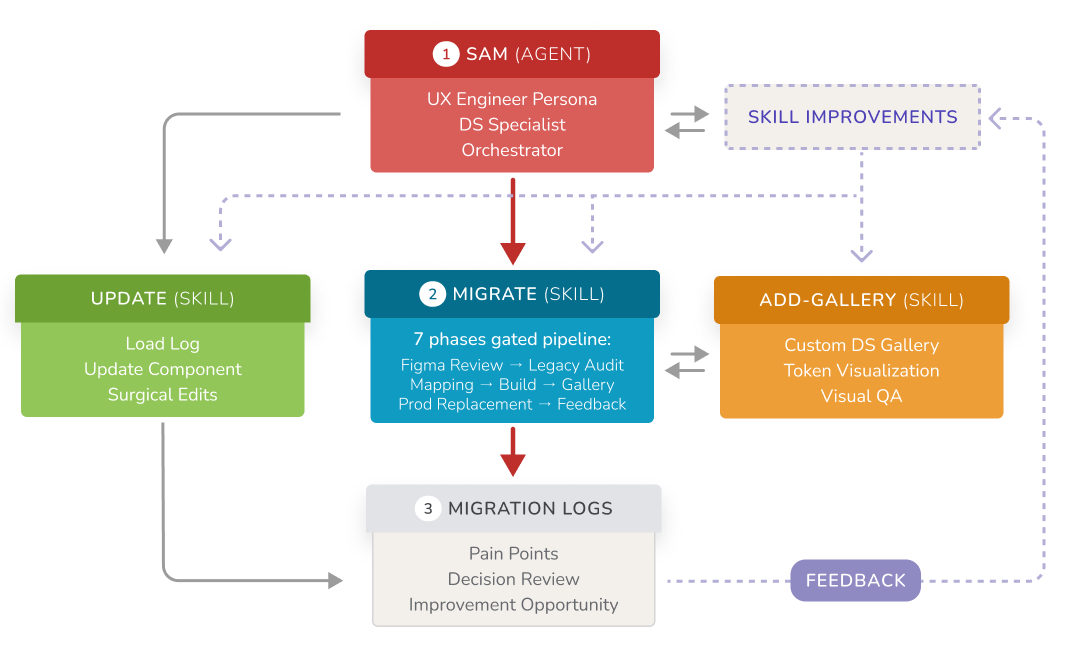
It’s a compounding effect: better instructions lead to fewer corrections, fewer corrections lead to faster migrations, and faster migrations mean I spend my time on design decisions, not implementation details.
The process:
• Review the Figma component and flag DS gaps
• Audit the legacy component in code
• Map design tokens → legacy values (reviewed before building)
• Rebuild using tokens only (no hard-coded values)
• Visual QA in a custom DS gallery
• Replace every legacy instance in production
• Retrospective + skill improvement
Technical Specs
Drone Smoothie uses a hybrid desktop architecture designed to balance performance, flexibility, and scalability.
Heavy video analysis is handled locally using Python and OpenCV, while the interface is built with modern web technologies and packaged as a cross-platform desktop app. This approach allows the system to process large video files efficiently while maintaining a fast, responsive UI and a single shared codebase across platforms.
Tech Stack
Frontend
Electron • Vanilla JavaScript • Custom Design System
Backend
Python • Flask • OpenCV • NumPy • FFmpeg
Key Features
Sparse optical flow analysis • DaVinci Resolve/Premiere/Final Cut XML export • Offline-first architecture
Why This Stack?
Python/OpenCV handles intensive video processing. Web technologies enable rapid UI development. Everything runs locally, no upload delays, no cloud costs.
Progress Tracking
Version Alpha is when the product will reach a point operational enough to have it tested by a few selected users. Collecting feedback for a last iteration before MVP.
- Core motion detection working across most footage types
- Performance optimized (20x faster with sparse optical flow)
- Design tokens and foundations established
- First component implemented (video file upload)
- Video analysis pipeline functional
- Smooth segments preview and video scrubbing
- DaVinci Resolve XML export working
Some Context
Overview
Drone pilots routinely spend hours sorting and trimming raw footage before any creative work can begin
With roughly 8% of Americans owning a drone, the volume of content is massive, but the real opportunity lies in the commercial segment, where editing complexity is higher and time directly impacts revenue.
These professionals are far more likely to pay for tools that remove friction from their workflow. The data points to a clear gap in the market: intelligent video sorting and automated cinematic segment detection that accelerates the most frustrating part of editing without taking creative control away.
The Idea
This project is a personal experiment in modern product building in the age of AI
As a senior UX designer with coding literacy, I’ve watched the designer-developer divide narrow dramatically. With today’s AI tools and coding agents, it’s possible to take full ownership of the product lifecycle.
Drone Smoothie is software I genuinely want for myself, but it’s also a deliberate attempt to go end-to-end: market analysis, prototyping, algorithm research, implementation, and ultimately a production-ready product with monetization potential. My goal is not just to ship software, but to prove that thoughtful execution, assisted by AI, can turn a real pain point into a viable, focused product.
The technical Heart
The smooth detection logic is essential to the success of Drone Smoothie. Getting it right meant building a separate testing environment to rapidly iterate without breaking the main app.
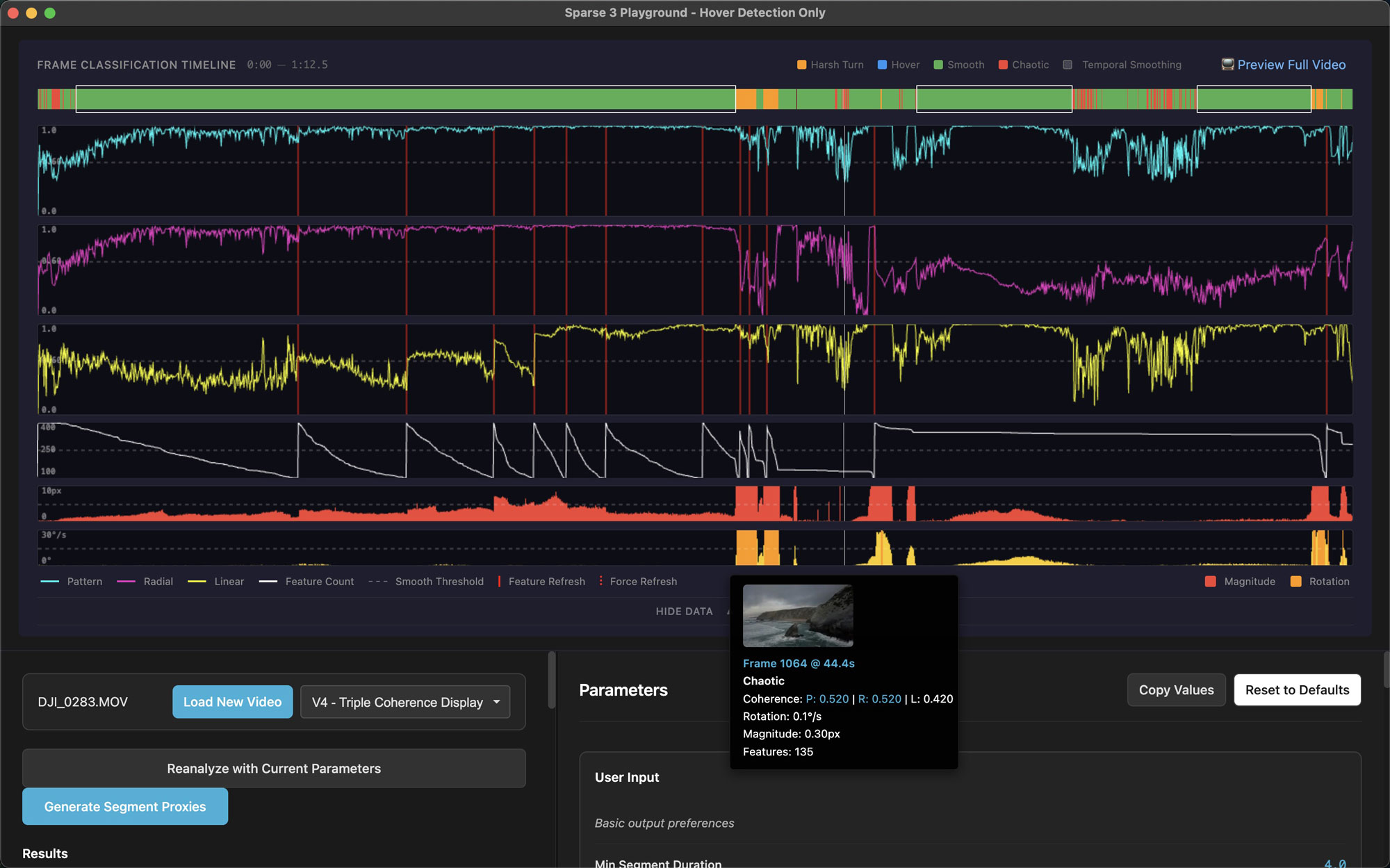
A particular attention was assigned to the visualization of the optical flow data, in order to clearly understand the mechanics of motion detection.
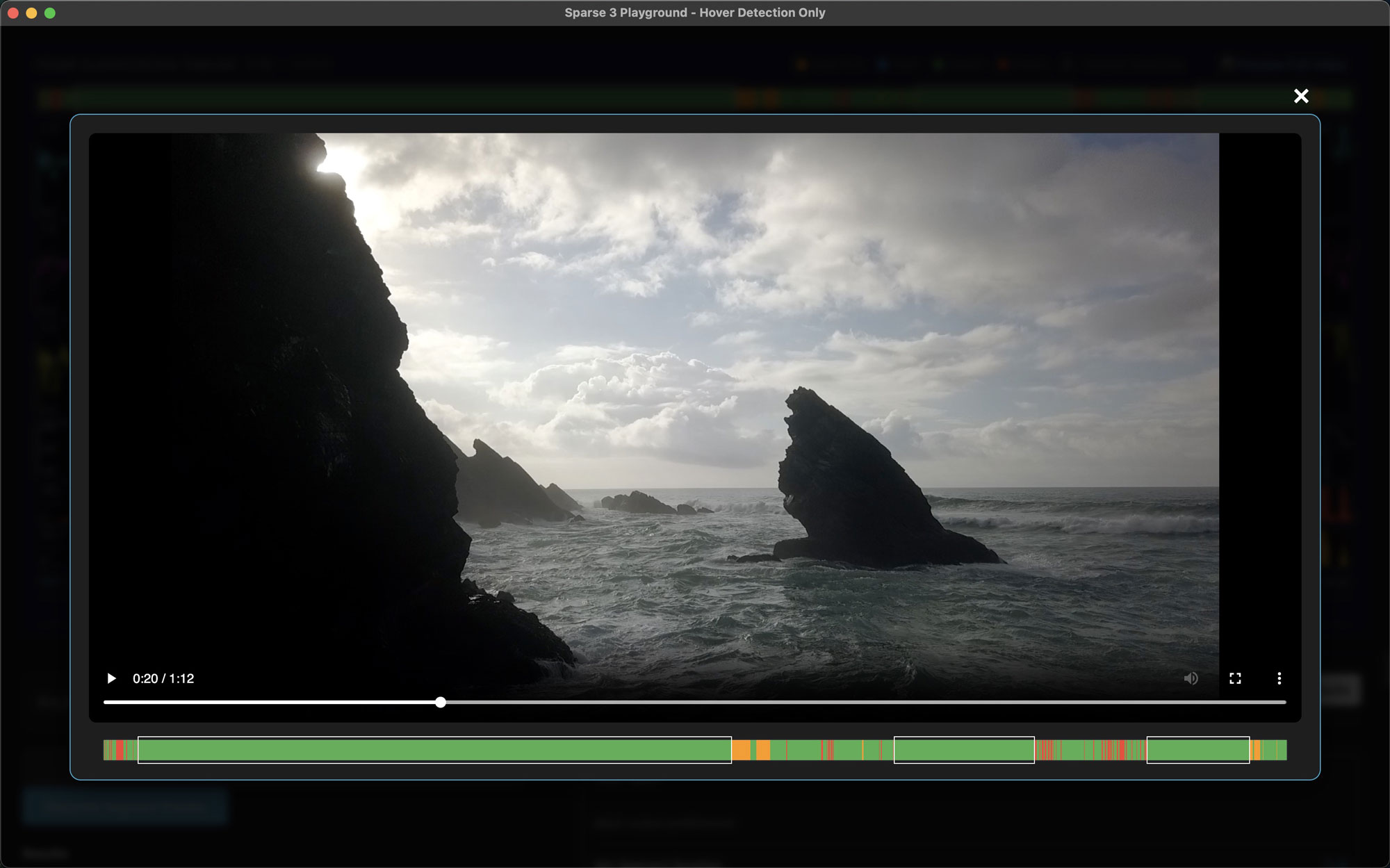
Lining up the video play back with the Frame Classification Timeline allowed me to clearly see how the smooth detection script was performing.
The challenge
Drone motion detection isn't just about measuring speed, it's about understanding context.
Accommodating vastly different pilot styles:
- Beginners record entire flights (20+ minutes) with erratic movements mixed with usable segments.
- Professionals shoot intentional clips (30-60 seconds) that are already mostly smooth.
- The algorithm needs to adapt to both—strict enough to filter amateur footage without over-filtering pro work.
Solutions
Rather than building one algorithm for all scenarios, I built a system that adapts.
Performance + intelligent detection:
- Optimized from dense to sparse optical flow—20x faster processing with comparable accuracy.
- Worked with Claude to extract insights from computer vision research papers.
- Introduced smart pattern coherence to distinguish intentional camera movement from chaotic corrections.
User Personas
AI was used to accelerate early persona exploration, helping synthesize patterns from pilot communities and my own professional experience.
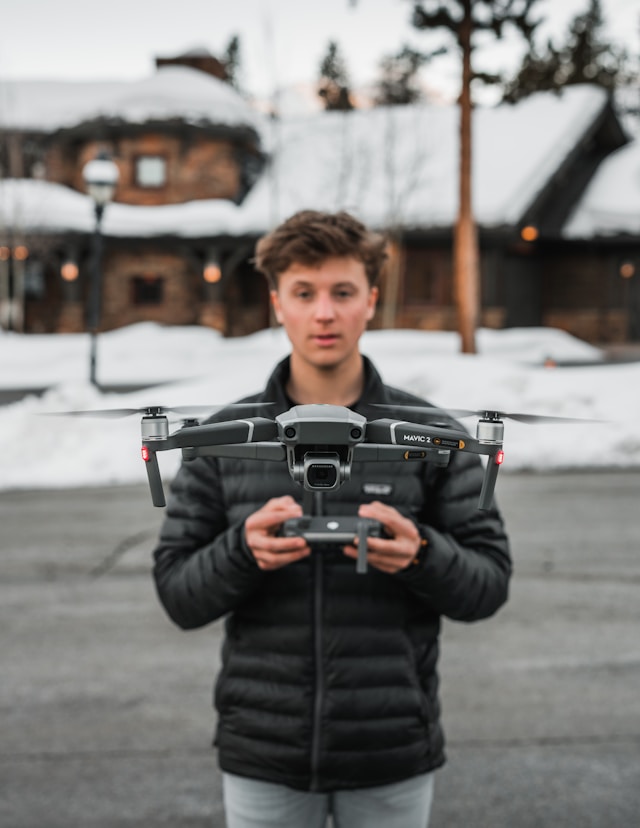
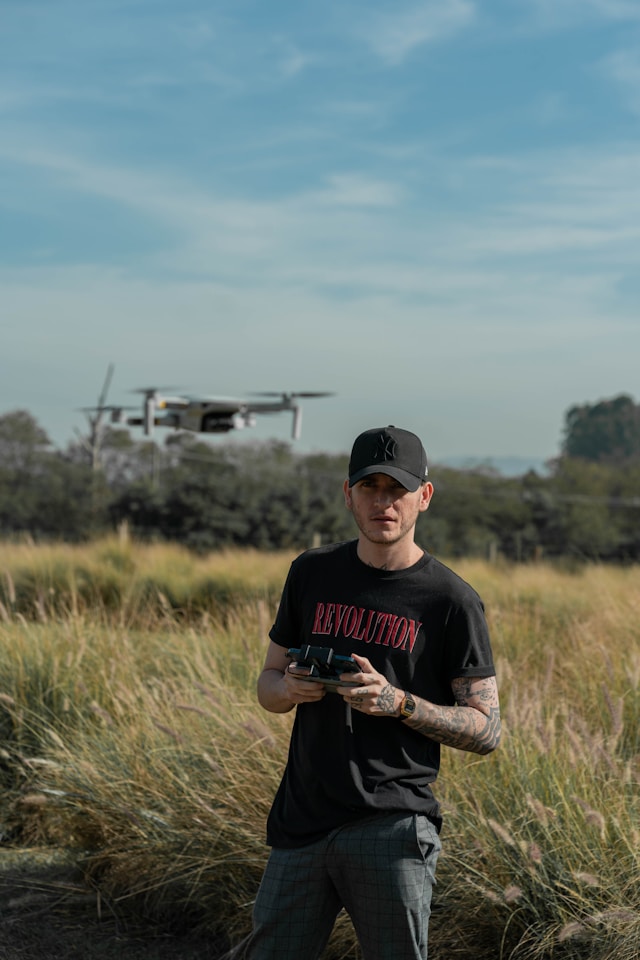
The Hobbyist Explorer
A casual drone pilot who flies for fun and personal enjoyment with no editing skills.
Michael brings his drone on trips, hikes, or vacations and treats it as a high-end adult toy rather than a filmmaking tool. Flights are often recorded from takeoff to landing with little planning or shot intention. Editing is usually handled by automated tools like DJI’s built-in apps, and the final videos are shared on social platforms or with friends. While the results may be rough, finishing a video feels empowering and rewarding, which is what matters most to him.
The Enthusiast Editor
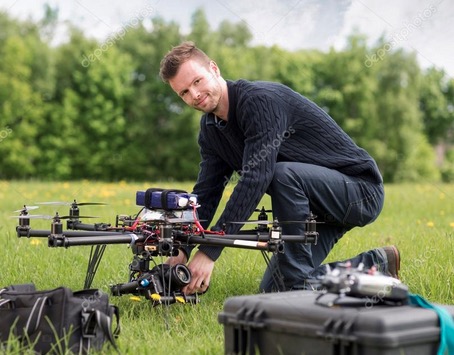
An experienced drone pilot who enjoys editing and has developed a personal workflow.
Fabian has been filming and editing for years, often holds a Part 107 license, and has completed paid work such as real estate or event coverage. He flies with more intention than a beginner and cares about smooth motion, pacing, and storytelling. However, reviewing long flights and trimming footage can feel tedious and time-consuming. He is looking for ways to speed up the editing process without giving up creative control.
The Professional Pilot
A seasoned drone professional who approaches flying and editing with intention.
Thomas plans his flights, understands camera movement, shoots in high-quality formats, and color grades his footage. Editing is a core part of his craft, and he maintains a large archive of drone material for both personal and client work. While he values precision and control, the volume of footage can become a bottleneck. He expects tools to integrate cleanly into professional post-production workflows and support efficiency without compromising quality.
96% of Pilots are men
Drone Smoothie is built for pilots who enjoy editing their own footage.
From casual hobbyists to experienced professionals, these users handle their entire workflow themselves and value speed, clarity, and creative control. Drone Smoothie supports this range of skill levels by adapting to different volumes of footage and editing intent, without taking authorship away from the creator.
Market Analysis
I used Perplexity to create a full US drone market analysis as well as defining main tendencies about editing habits and favorite video editing tools.
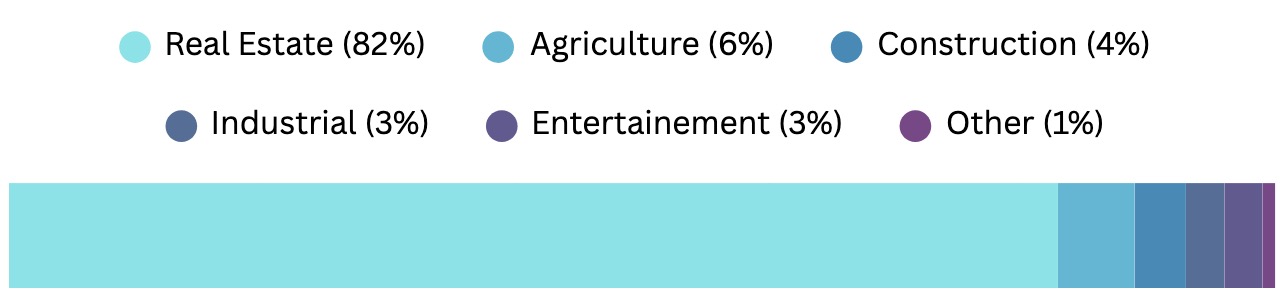
The photography/real-estate category (which includes creative aerial imaging) clearly dominates the registered commercial fleet.

Most drone footage is edited in general-purpose video editors like Premiere, Final Cut, and DaVinci Resolve.
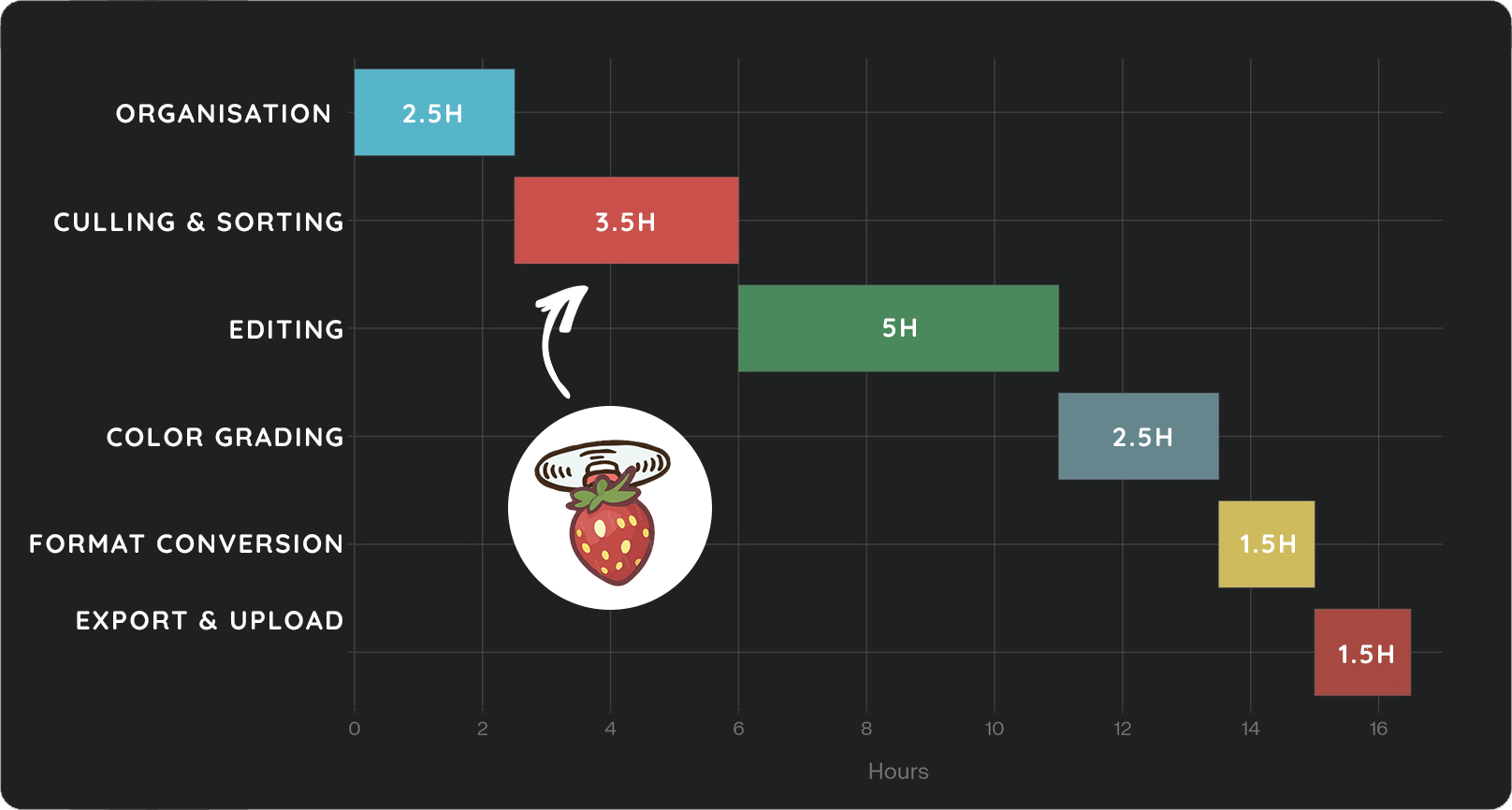
The sorting crisis is real: Phases 1-2 alone (Organization + Culling) consume 5-7 hours, or 35-50% of total project time. This is the highest-value automation opportunity.
What it means
The drone market is large, growing, and dominated by DJI, allowing Drone Smoothie to focus on a well-defined ecosystem. Editing remains a major pain point, especially the time-consuming work of sorting and trimming footage, which many pilots still do manually. By prioritizing XML exports for Premiere Pro, Final Cut Pro, and DaVinci Resolve, Drone Smoothie fits directly into existing workflows for both hobbyists and professionals. Within this space, real estate drone operators stand out as a strong early niche, where faster editing translates directly into higher productivity and clear willingness to pay.
Design System
I’m intentionally keeping the design system lean right now, but debt-proof for easy scalability. Once the core motion detection is dialed in, I’ll expand the component library and refine the visual design.
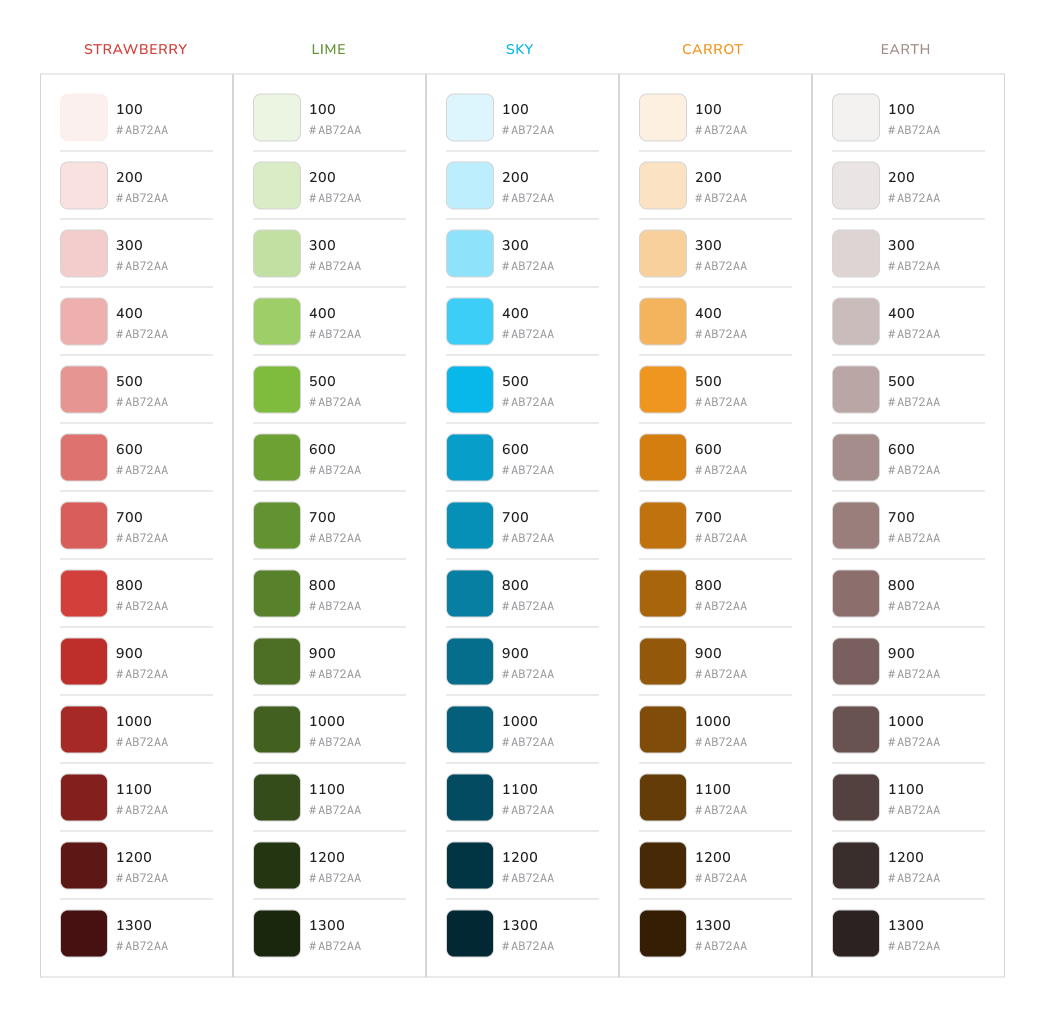
The color primitives have an extensive palette to cover all use cases. I wanted a vibrant palette and had a little fun picking names in relation to the concept!
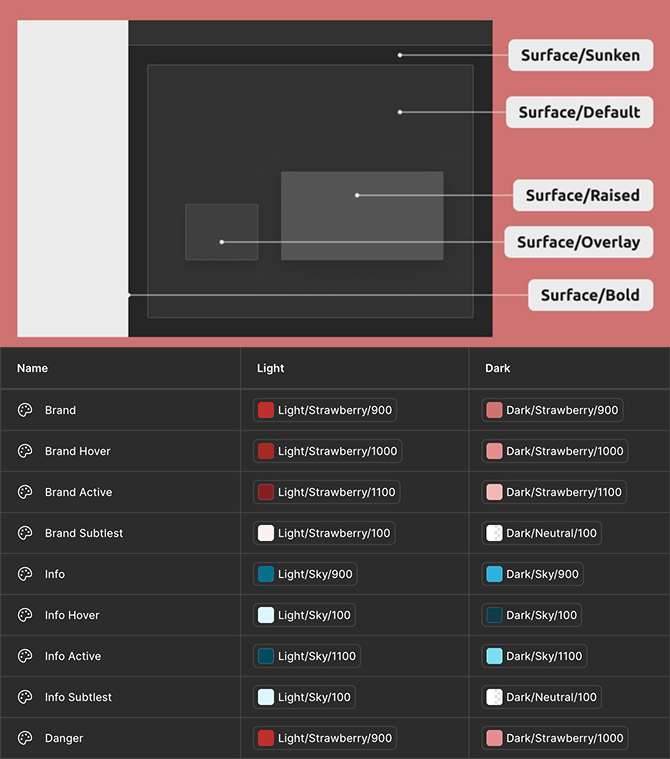
The semantic color tokens for surface, borders, icons and texts have been defined with light and dark mode available from the start.
Prototyping
After building the main components, I was able to experiment with what the smooth analysis would feel like using Figma Make.
Becoming a Digital Architect
The future of product work isn’t “designers who code” or “engineers who design”, it’s digital architects who do both, using AI to execute at the speed of thought.
Speed without sacrificing quality
Traditional timeline: 6+ months with a small team
AI-assisted timeline: 6 weeks, solo
The difference? AI handles implementation while I focus on product decisions, design quality, and user experience. This shift unlocks rapid prototyping and validation. I can test ideas with working software in days instead of weeks.
Human engineers remain invaluable for architectural thinking, optimization expertise, and problem-solving at scale. But for solo product exploration and rapid validation? AI as a development partner changes everything.
Bridging disciplines operationally
I’m not “learning to code”—I’m using AI to execute at engineering speed while maintaining design craft. This develops an engineering mindset: thinking in systems, data flows, and technical constraints makes me a better designer.
But here’s what excites me most: taste still matters deeply in UX. Efficient code is efficient code, but crafting an experience that feels right requires human judgment, empathy, and iteration (for now?). The result is production-ready software, not just prototypes.
